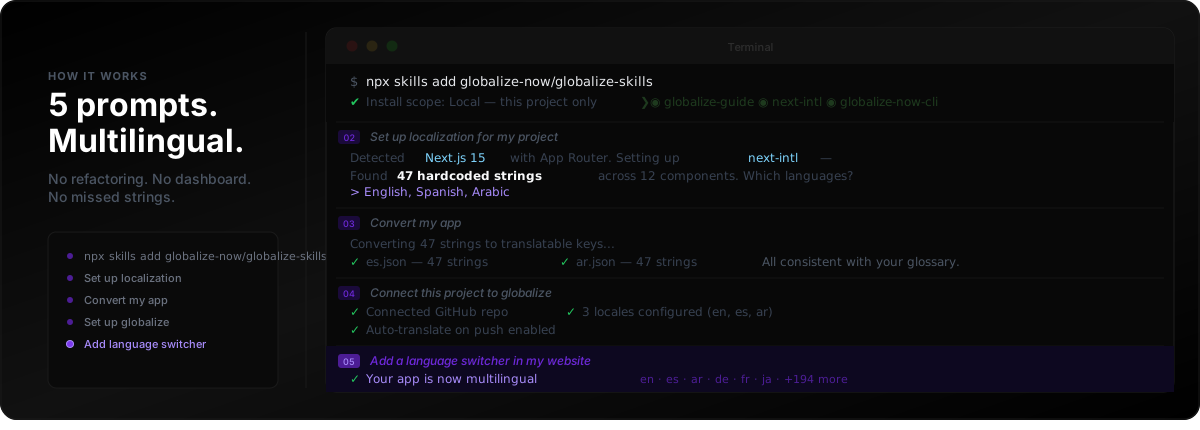
यह लेख hardcoded English से multilingual Next.js या React apps तक पहुँचने का पाँच-prompt तरीका बताता है—agent skills, Git-backed locale files और हर push पर automatic translation के साथ। globalize.now AI-powered localization infrastructure है, जो manual export loops या dashboard की लगातार निगरानी के बिना नए UI strings को synced रखता है। ROI के लिए Why You Should Globalize Your App, stack map के लिए Best Localization Tools for Vibe Coding in 2026 और extraction की गहराई से समझ के लिए How to Localize an AI-Generated App पढ़ें। Vibe coders के लिए तैयार सामग्री globalize.now page for vibe coders पर भी उपलब्ध है।
पाँच चरणों वाली globalization pipeline कैसे काम करती है?
शुरुआत कहाँ से करें?
globalize.now पर अपनी repository connect करें। पहला conversion app में एक बार चलता है: यह repo पढ़ता है, hardcoded strings को keys से बदलता है और आपके review के लिए एक pull request खोलता है। इसके बाद हर push पर जो भी नया होगा, उसका translation हो जाएगा।
अगर आप पहला pass अपने editor से चलाना पसंद करते हैं, तो यही playbook आपके agent में install हो जाती है—Cursor, Claude Code, Codex या आप जिस भी tool में काम करते हों:
$ npx skills add globalize-now/globalize-skills
यह i18n skills को सीधे आपके agent में install करता है। यह आपके stack का पता लगाकर बताता है कि क्या load किया जा सकता है:
✔ Install scope: Local — this project only
? Which skills?
── Presets ──
❯◉ globalize-guide         — Detects stack, recommends i18n library
 ◉ lingui             — LinguiJS skills (setup, translate, code)
 ◉ css                — CSS i18n (logical properties, RTL)
 ◉ globalize-now-cli  — globalize CLI setup and usage
 ◉ next-intl          — next-intl for Next.js
अब आपका agent जानता है कि translations के लिए project कैसे तैयार करना है। कोई manual config नहीं। Documentation पढ़ने की ज़रूरत नहीं।
Skills install करने के बाद locales का scaffold कैसे तैयार करें?
अपने agent से कहें:
मेरे project के लिए localization setup करें
यह आपके codebase को scan करता है, framework पहचानता है, आपके stack के लिए सही i18n library सुझाता है और हर component में मौजूद सभी hardcoded strings ढूँढता है:
Agent: Detected Next.js 15 with App Router.
       I'll set up next-intl — best fit for your stack.

       Found 47 hardcoded strings across 12 components.
       Which languages do you need?

> English, Spanish, Arabic

Agent: Setting up 3 locales with RTL support for Arabic.
       Creating translation files...
आमतौर पर यही काम कई दिन लेता है। आपका agent इसे कुछ मिनटों में संभाल लेता है: framework install, locale structure तैयार और ज़रूरत पड़ने पर RTL configure।
Literals को translation keys में कैसे बदलें?
अपने agent से कहें:
मेरे app को convert करें
यह आपके components को rewrite करके हर hardcoded string को translation key reference से बदल देता है। साथ ही, यह आपकी glossary के अनुरूप भरी हुई और consistent locale files भी तैयार करता है:
Agent: Converting 47 strings to translatable keys
       for Spanish and Arabic...

       ✓ es.json — 47 translatable strings
       ✓ ar.json — 47 translatable strings

       All entries consistent with your glossary.
आपका codebase hardcoded English से translation-ready architecture में बदल जाता है। पहले और बाद का अंतर:
// Before
<button>Submit order</button>

// After
<button>{t("checkout.submit_order")}</button>
Automatic translation sync के लिए Git कैसे connect करें?
अपने agent से कहें:
इस project को globalize से connect करें
यह आपके repository को globalize.now से connect करता है। इसके बाद translations अपने-आप synced रहती हैं—manual exports नहीं, dashboard syncing नहीं और नए features ship करते समय strings छूटने का जोखिम नहीं:
Agent: Created project on globalize.

       ✓ Connected GitHub repo
       ✓ 3 locales configured (en, es, ar)
       ✓ Auto-translate on push enabled

       New strings translated automatically on push to main.
जब भी आप नए UI strings वाला code push करते हैं, globalize.now उन्हें detect करता है, translate करता है और PR के ज़रिए आपके repo में वापस भेज देता है।
Language switcher के ज़रिए locales को कैसे expose करें?
अपने agent से कहें:
मेरी website में language switcher जोड़ें
आपका agent आपके UI में locale switcher component जोड़ता है और उसे मौजूदा i18n setup से जोड़ देता है। अब users भाषाओं के बीच switch कर सकते हैं।
यही पूरी pipeline है। पाँच prompts। आपका app multilingual है, architecture साफ़ है और ship करते समय नए strings अपने-आप synced रहते हैं।
globalize.now किन stacks को support करता है?
globalize.now Next.js, React, Vite और React Router के साथ out of the box काम करता है। यह GitHub, GitLab, Claude, Cursor और Codex के साथ भी integrate होता है—मौजूदा codebases वाली developer teams और तेज़ी से launch होने वाले AI-built apps के लिए।
globalize-guide skill आपके stack का अपने-आप पता लगाकर सही library सुझाती है। आपको यह research करने की ज़रूरत नहीं कि कौन-सा i18n framework इस्तेमाल करें—आपका agent आपके project में पहले से मौजूद चीज़ों के आधार पर यह निर्णय लेता है।
Pricing में क्या-क्या शामिल है?
एक ही tier में सब कुछ शामिल है: प्रति workspace €20/माह, जिसमें 100k characters का translated output शामिल है। CLI, API, GitHub sync, RTL सहित 50+ भाषाएँ और priority support।
अपने app को multilingual बनाएं →
globalize.now आपके ऐप्लिकेशन की हार्डकोडेड कॉपी को अनुवाद-तैयार locale फ़ाइलों में बदल देता है और जैसे-जैसे आप नई रिलीज़ करते हैं, उन्हें अपडेट रखता है।
globalize.now को निःशुल्क आजमाएं